
I have been writing up a bunch of Plantronics devices recently. Specifically, I have been highlighting some of the newer devices that I have been fortunate enough to work with because of my excellent relationship with the Plantronics team. Now that I am here in California and specifically working for Janalent as a Lync and voice integrator, it is critical to not only understand what the Lync device options are, but also have some experience in using as many of the devices as possible. The device I’m writing about today, the Voyager Pro UC v2 (otherwise known as the B230-M) is not a new device. However, I recently had the opportunity to add yet another way to utilize the headset that has made a direct impact to me personally.
A little about the Voyager Pro UC v2
The Voyager Pro UC series of devices were originally available as part of the OCS Certified Devices. The obvious benefit of the Voyager Pro was that it would allow you to pair the device to BOTH a mobile phone AS WELL as your PC and subsequent softphone. Both devices came with a USB accessory that was important for getting the most out of the device. What is most noticeable as far as the original WG201 (Voyager Pro UC) versus the B230-M (Voyager Pro UC v2) is that there has been a major change to the USB accessory that is included
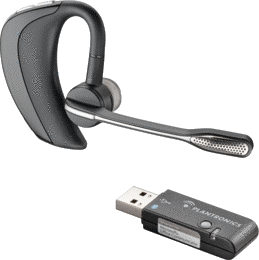
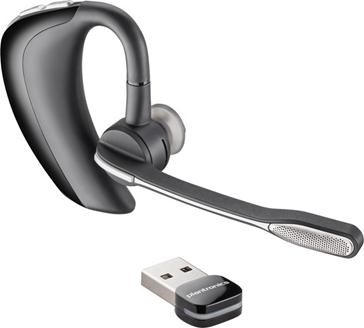
The image on the left is of the original WG201, Voyager Pro UC. The USB accessory is larger and has a button to enter pairing mode to ensure that the headset properly pairs. What became apparent was that users that loved the headset would try to leave the key attached to their laptop and that would make for some unhappy folks because it either wouldn’t fit in the laptop bag or, it would wind up getting damaged in transit. Fast forward a couple of years and we now have the device on the right. The design is largely the same, but the USB key has been reduced to roughly the size of a dime. This solves the issue of transporting a PC with the key still plugged in. That makes a tremendous difference. It’s important to note that despite the fact that MANY notebooks come with available Bluetooth stacks, it is recommended that you continue to use the USB Key that is delivered with the Voyager devices. It makes it possible to get the necessary drivers to ensure wideband audio on your calls when using a softphone.
The v2 version of the Voyager also takes advantage of a number of advances in technology. The headset is smart from a standpoint of it doesn’t require you to push a button to answer a call. All you have to do when you have an incoming call, is put the headset on. Sensors in the headset detect that it has been put on and will auto-answer the call. Additionally, those sensors make it possible to “lock” the headset to ensure that when you aren’t wearing it, you won’t make any outbound calls.
Finally, a very helpful innovation is the ability of the Voyager to assist in updating your presence. If you are connected to OCS/Lync or Skype and a call comes in to your mobile phone, your presence will automatically be updated to reflect that you are busy on a call. That is a very helpful addition to the software to prevent you from having to fend off calls from your co-workers, if they are acknowledging your presence, you won’t have to worry about dealing with incoming calls to your softphone.
But What Else Can It Do
So the title of this article references additional capabilities of the voyager pro. Let me just say that I’m sure that we can probably use any headset for the functionality that I am going to describe. That said, since I have been providing reviews of Lync enabled devices, this offered me the opportunity to highlight the voyager pro UC while talking about some terrific functionality in our Panasonic Cordless phones at home. What has become a recent feature in cordless phones for home/work is that ability to support Bluetooth devices. That is to say, in the case of our Panasonic phone, we can pair 2 bluetooth devices (read, Mobile Phones) to the base of the Cordless Phone. That allows me to use the cordless handsets as devices for answering my mobile phone, if my mobile phone rings and isn’t immediately handy. The Bluetooth stack in the base ALSO makes it possible to pair a Bluetooth HEADSET to the base. So, rather than having to cart around the handset and deal with a corded headset with it, all you need to do is have a Bluetooth headset (such as the Voyager pro UC) and you will be able to answer an incoming call to your home phone. This is critical if you have folks (such as my spouse at home) who have neck/shoulder issues and cradling a phone on their shoulder will cause issues, but they need both hands free. In this case, I had a Voyager Pro UC that I received from Plantronics recently, and I gave that to my wife. She has become an instant fan and this has been a huge quality of life change for her since she spends a lot of time on the phone (the Voyager provides 6 hours of talk time) and I charge it every night so it will provide days of standby time if she isn’t on the phone.
What does this all mean
So bottom line, the voyager pro is a compact device that now is very compatible with the mobile worker. The new USB key makes it very transportable and of course the audio quality is outstanding as it is a certified device so it supports wide band audio. That said, the new sensors provide some conveniences in answering calls and the software makes it possible to properly update presence even when answering a mobile phone. MOST IMPORTANTLY, with Bluetooth enabled home phones, it acts as a headset for your home phone and allows for comfortable hands free without requiring you to carry a handset around. Overall, a very good device if you have an affinity for Bluetooth headsets.


Leave a Reply